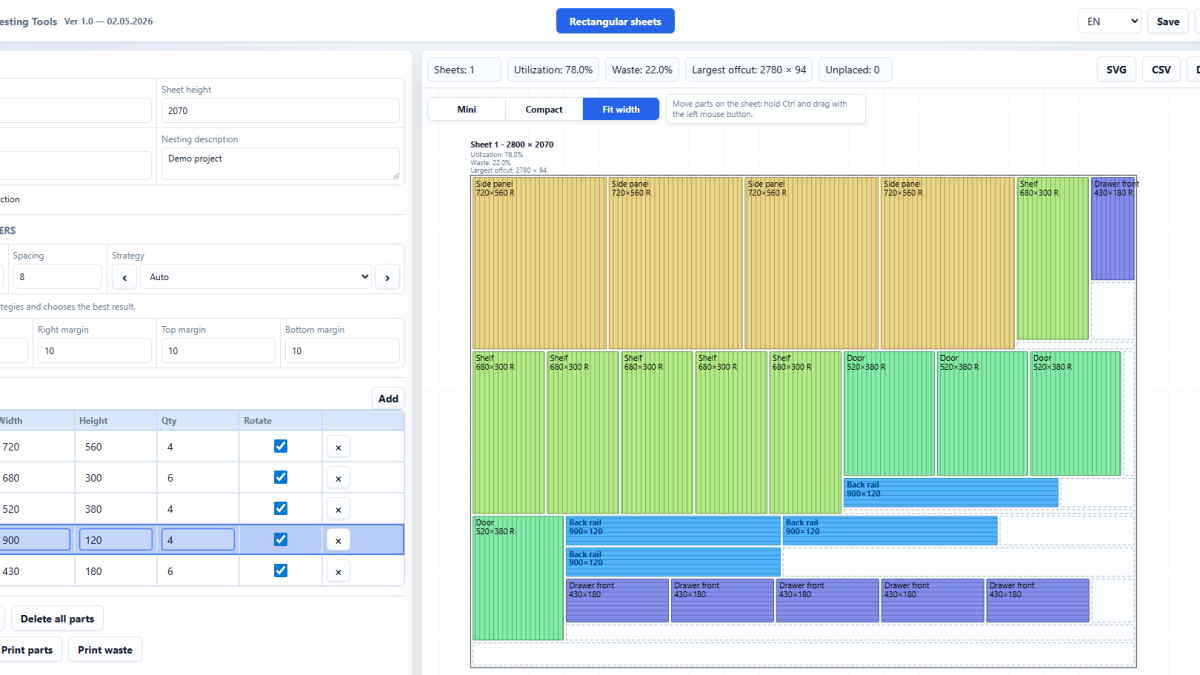
CNC Passport now has a new service: Nesting Tools. It is a browser-based tool for people who work with sheet materials and need to prepare a cutting layout quickly: set the sheet size, add parts, account for spacing, edge margins and kerf, and get a clear placement plan.
We are starting with a practical problem many workshops know well: there is a sheet, there is a list of parts, material is limited, and the answer is needed now, not after setting up a heavy production system. Nesting Tools opens in the browser and does not require a complex installation. That matters for small shops, training rooms, technologists, shop-floor supervisors and anyone who often checks cutting options before handing the job further down the process.
Why we started with sheet nesting
In sheet production, waste often appears before the cutting actually starts. Parts are placed too loosely. Material direction is ignored. A minimum margin is forgotten. The layout is saved in a format that is awkward to reuse. Later this becomes extra offcuts, repeated preparation or a conversation at the machine when the job should already be moving.
Nesting Tools is intended as a fast working layer between the idea of a layout and the next production step. It is not trying to replace the whole manufacturing system. Its first job is simpler and more useful: give a person a clear way to build a layout, compare the result and save the data in a usable form.
What Nesting Tools can already do
The current version focuses on rectangular sheets and rectangular parts. That scenario covers a large number of real tasks: furniture panels, blanks, simple fronts, cabinet elements, process trials and training assignments.
- set sheet width and height;
- add a part list with dimensions and quantities;
- account for spacing between parts, edge margins and kerf;
- use different placement strategies;
- see statistics for sheets, material use and waste;
- save the result and export the layout to DXF or SVG.
We deliberately kept the interface direct. If someone wants to check quickly how many sheets an order will need, they do not need another layer of explanation. They should open the service, enter the sizes and see the result.
Not only for large factories
Sheet nesting is often treated as a task for a large factory with a dedicated software package. In practice, quick nesting is useful in a small workshop too. Sometimes the task is to estimate one order. Sometimes it is to check whether a set of parts fits into an offcut. Sometimes it is simply to show a customer or colleague why one layout was chosen over another.
There is also a training use case. When a student or beginner sees how the layout changes after changing spacing, rotating a part or adjusting sheet size, material stops being an abstract number. The mistake becomes visible at once. It is a good way to explain why “almost fits” does not work in production.
Export formats matter from the first release
One of the first things we added was export. A cutting layout should leave the browser in a useful form, not remain only as an image on the screen. That is why Nesting Tools supports export to DXF and SVG.
DXF is useful for passing data into a CAD/CAM chain or internal workflow. SVG is useful for viewing, documentation, quick approval and visual sharing. Not every layout goes straight to a machine; sometimes it first needs to be shown, discussed and stored as a clear version.
What comes next
Nesting Tools will develop in stages. The current foundation is rectangular sheets and a clear workflow for sheet cutting. The next steps will be connected with more complex contours, geometry import, improved placement strategies and broader production scenarios.
We do not want the first release to become an overloaded system with many promises and little everyday value. It is better to release a working tool that already helps calculate and check sheet layouts, then grow it around real user tasks.
Where to open the service
Nesting Tools is already available at https://nest.cncpassport.com/. The product name stays the same in every language because it is a separate service inside the CNC Passport ecosystem.
For us, this is the second independent tool in the CNC Passport product line. It solves a different production problem: not candidate search, not a specialist profile and not training content, but preparation of sheet cutting layouts. This is how we plan to keep developing the platform: through focused working tools that solve concrete tasks without unnecessary noise.