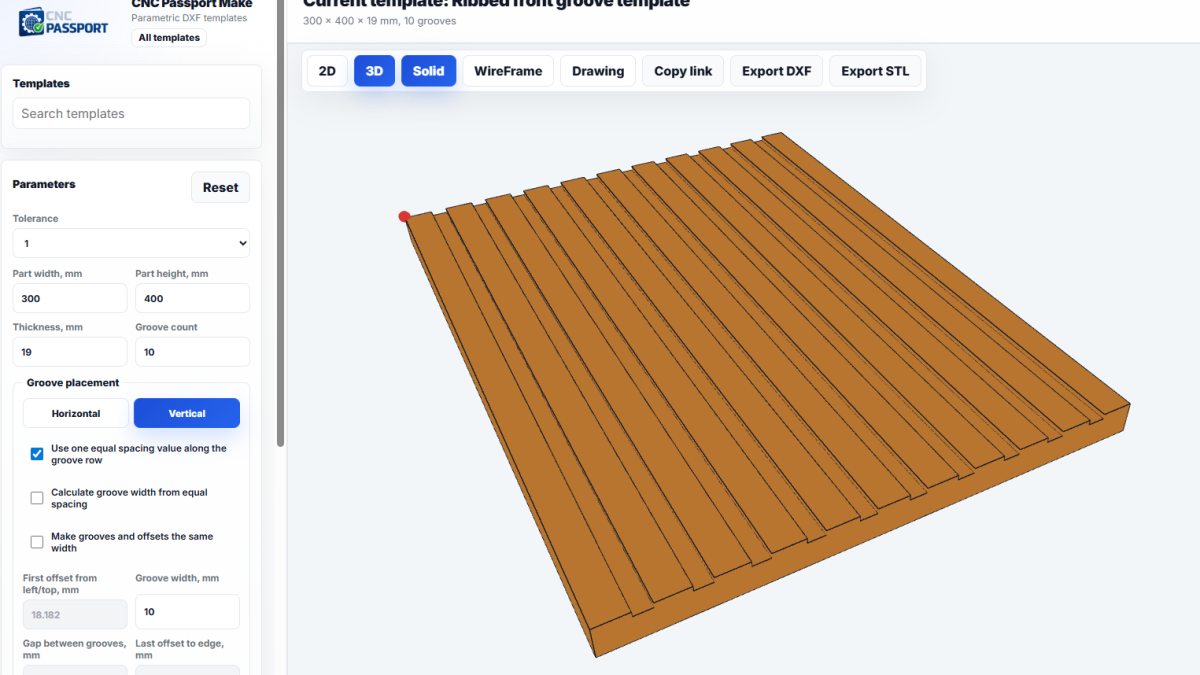
Preparing a simple part for a machine often looks too small to deserve its own discussion. A shelf with a cutout, ventilation slots, a front with repeated grooves, a small process plate. But these are exactly the details that consume time: open CAD, build the geometry, check dimensions, export DXF, then ask again which version actually went to the machine.
In production, it is rarely just one part. Today one variant is needed, tomorrow the same element has to be 40 mm wider, an hour later the radius changes, then the customer asks for a different slot length. If every version is drawn again by hand, a mistake gradually becomes only a matter of time. Not because the person works badly, but because a repeated manual operation eventually starts to wear people down.
CNC Passport Make addresses exactly this part of the workflow: preparing parametric DXF templates for typical production parts. The point is not to replace a full CAD system. The point is different: move repeatable geometry into a controlled template where an operator, technologist, furniture maker, or shop-floor supervisor changes parameters instead of redrawing the shape from zero.
Where manual DXF preparation starts slowing work down
The problem usually does not appear on complex housings or one-off engineered products. There, CAD is justified, and nobody expects the part to be ready in a minute. The slowdown starts with repeatable elements that look simple but constantly change in size.
For example, a panel needs a row of ventilation slots. One order uses a 40 mm pitch, another uses 35 mm. One version needs a larger edge margin, another changes the panel width. When this is done manually, several things have to be watched at once: whether the first slot moved, whether symmetry was broken, whether an extra element appeared near the edge, whether the label or file name was updated.
On the shop floor, this kind of error looks ordinary. The file seems close to correct, the machine runs normally, and then during assembly it turns out that the slot row has shifted or the part no longer matches the neighboring component. Fixing it takes more time than preparing the original file.
A parametric template removes unnecessary manual drawing
With a parametric approach, the user changes values rather than lines: width, height, radius, repeat count, offsets, pitch, material thickness. The geometry is recalculated according to the template rules. This is especially useful when a part has clear logic but many size variants.
For production, the effect is simple: fewer operations where someone can accidentally shift a contour, forget an element, or export the wrong version. The person still makes the decision, but the work becomes closer to configuring a verified template than to constantly rebuilding the same shape by hand.
This does not remove engineering review. A parametric template should not become a magic button that means “make it right.” But it helps remove the dull mechanical part where small errors most often appear.
What the CNC Passport Make library provides
Make works as a library of ready parametric DXF templates. The user chooses a part type, enters dimensions, and gets geometry that can be used further in the production process. This format is especially convenient for small workshops, furniture production, prototyping, and preparation tasks where it is not always reasonable to start a large CAD process for a simple shape.
Right now, Make is well suited to parts that repeat with changes: ventilation slots, ribbed fronts, shelves, or panels with cutouts. These objects have a typical structure, but their dimensions almost always depend on the specific order.
- The template helps produce the base geometry faster.
- Parameters make a part variant understandable and repeatable.
- DXF can be passed further into CAM, to the shop floor, or into a company workflow.
- Repeatable elements depend less on careful manual copying.
The most important thing here is not speed by itself. It is easy to create a wrong file quickly. The value appears when speed does not destroy control over the dimensions and the logic of the part.
Why this is useful beyond the machine operator
Parametric DXF templates are often treated as a tool for the person near the machine. In practice, they are useful more broadly. A technologist can explain allowed parameters more clearly. A shop-floor supervisor can repeat an already checked variant more easily. A manager or designer can pass on a task with fewer clarifications if the part shape is described through clear fields.
In a small company, this can reduce dependence on one person who “knows how we usually draw these parts.” In a larger company, it helps standardize small preparation operations that otherwise live in personal folders, old files, and copies with names like final_new_2.dxf.
Production discipline often holds together, or slowly falls apart, on details like this. Not in a polished process presentation, but in how quickly and with how little confusion the team gets correct geometry for a repeatable part.
Where Make should not replace full design work
Parametric templates have a natural boundary. If a part requires complex engineering logic, fits, calculations, relationships with several assemblies, or a non-standard 3D model, it belongs in a full CAD environment. Make should not replace design engineering where engineering design is actually required.
For repeatable 2D contours and production blanks, however, this approach is often faster and calmer. There is no need to open a heavy project every time, search for an old file, or check where the previous version came from. It is enough to choose the correct template and set the parameters deliberately.
That is a useful working compromise: complex work stays in CAD, and typical work moves into a library of parametric tools.
How it speeds up part preparation
The speed gain does not appear only at the moment of DXF export. It accumulates across the whole chain. Less time is spent building geometry, fewer questions appear when an order repeats, dimensions are easier to check, and it is easier to explain to another person what exactly changed.
When a template is used regularly, it becomes part of the production memory. The team no longer has to remember how that slot was drawn last time. It works with parameters that can be repeated, compared, and adjusted when needed.
For CNC Passport Make, this is the main practical purpose: give production a fast entry into parametric DXF preparation without unnecessary complexity. Not instead of experience, not instead of checking, and not instead of normal process thinking. Alongside them, in the part of the workflow where repeatable geometry should take minutes instead of turning into its own small shift of work.