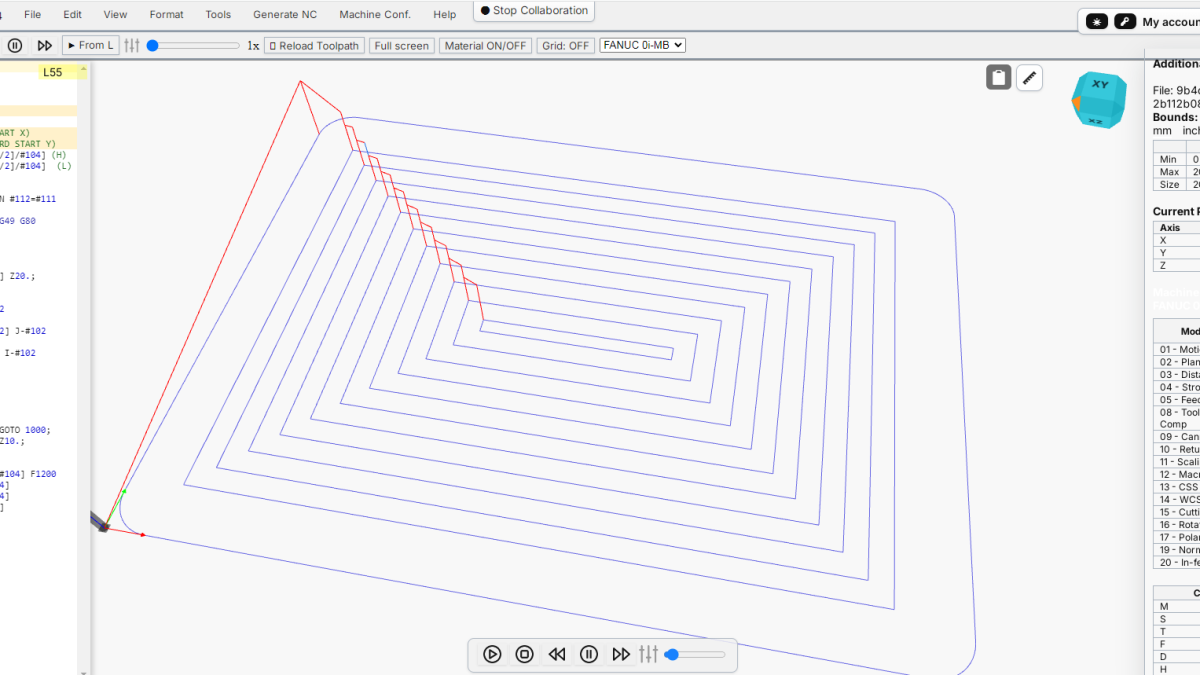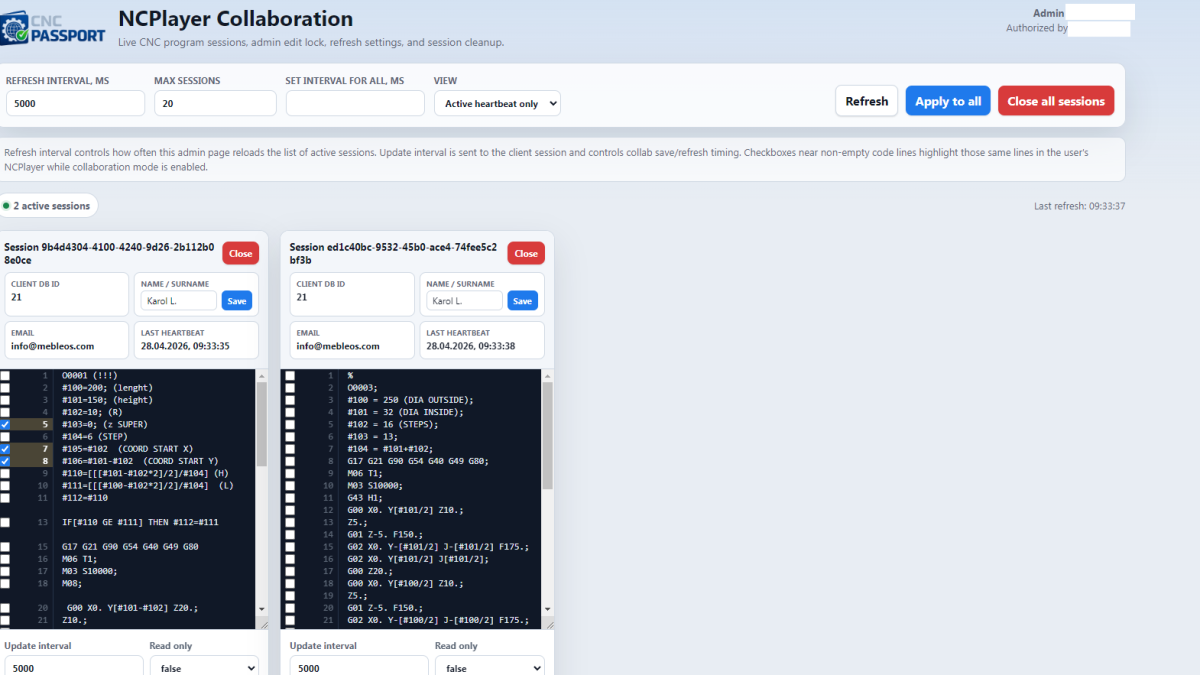
NCPlayer is an online CNC simulator and G-code debugger by CNC Passport. One of the important capabilities of NCPlayer is collaboration mode: a way to connect several participants to the same control program so they can diagnose errors faster, check the toolpath, explain G-code logic, and help an operator or programmer without sending files back and forth.
In CNC production, it is common for one person to see a problem at the machine, another person to know the postprocessor, a third person to own the process plan, and a fourth person to understand the G-code error quickly. Without a shared working space, this communication turns into a chain of screenshots, archives, messages, and verbal explanations. Collaboration mode in NCPlayer exists to shorten that path.
What Collaboration Mode In NCPlayer Means
Collaboration mode in NCPlayer allows a CNC program to be opened in a shared session where the client and an administrator or support specialist can see the same NC code, track changes, highlight important lines, and help analyze the program when needed.
It is not just a chat next to an editor. Its value is that the discussion is tied to the actual control program. Instead of saying “look somewhere in the middle, after the tool change,” a specialist can point to a specific line, see the same G-code, and analyze the issue in the context of simulation.
This is especially important in production because CNC program errors are often not caused by a single command, but by a combination of conditions: coordinate system, G90/G91 mode, tool compensation, G2/G3 arcs, plane selection, subprograms, macro variables, or jump logic.
Who Needs Collaboration Mode
Collaboration mode is useful not only for programmers. It covers several practical scenarios for different participants in the CNC process.
For CNC Programmers
A programmer can quickly show colleagues a fragment of the control program, explain the selected strategy, check a suspicious section, or ask another specialist to review the code before it is sent to the machine.
This is especially useful when working with long programs where the real error may be far away from the line where the problem becomes visible. Shared review helps locate the source faster: an incorrect jump, a forgotten G-code, wrong compensation, or a conflict between modal states.
For CNC Machine Operators
The operator is often the first person to see the problem: unusual movement, a toolpath mismatch, a controller alarm, an unexpected stop, or suspicious program behavior. But it is not always easy for an operator to describe the issue in words.
In collaboration mode, the operator can open the program in NCPlayer and connect a specialist who sees the same code. This reduces the risk of misunderstanding and speeds up the decision: whether production can continue, whether the program must be changed, whether the run should be stopped, or whether the CAM project needs review.
For Technologists And Shop-Floor Leaders
A technologist needs to understand not only G-code syntax, but also the production meaning of the program: safe approaches, operation sequence, tool changes, allowances, rapid movements, and potential risk zones.
Collaboration mode lets the technologist review the program together with a programmer or operator and discuss not an abstract file, but specific NC-code lines connected to specific toolpath behavior.
For Support Teams And Postprocessor Specialists
When a client reports a problem with a postprocessor, simulation, or G-code interpretation, support needs to see the source code. Sending the file can be inconvenient, especially if the program changes during diagnosis.
Collaboration mode allows support to connect to the current version of the program, inspect the problematic lines, and give precise recommendations. This reduces the number of clarification messages and speeds up incident analysis.
For Instructors And Training Centers
For G-code training, collaboration mode is especially useful. An instructor can open a program, highlight lines, explain tool motion, show the consequences of commands, and demonstrate typical mistakes.
The student sees not a static example in a presentation, but a live control program. This format helps students understand G-code modality, coordinate systems, absolute and incremental programming, drilling cycles, and CNC program structure.
Why Sending A File Is Not Enough
At first glance, it may seem enough to send an NC file by email or messenger. In practice, this often creates more problems than it solves.
- The file can become outdated within minutes after it is sent.
- Different participants may open different versions of the program.
- It is difficult to explain exactly which line needs attention.
- Screenshots do not provide the full program context.
- After a correction, the file must be sent again and the changes explained again.
Collaboration mode solves the problem differently: participants work around one active session. This makes the discussion more precise and reduces version confusion.
A Practical Example Of Use
Imagine this situation: an operator starts checking a program and sees a suspicious movement after a tool change. The operator is not sure whether it is related to G90/G91, the coordinate system, or an error in the CAM postprocessor.
Without collaboration mode, the process usually looks like this: the operator takes a screenshot, sends the file to the programmer, describes the problem, the programmer opens the file locally, tries to find the location, asks follow-up questions, and the operator checks the machine or simulator again.
With collaboration mode, the process becomes shorter:
- The operator enables collaboration mode in NCPlayer.
- The specialist opens the session in the admin panel or support interface.
- Both participants see the same program.
- The specialist highlights suspicious lines.
- The operator immediately sees which code section is being discussed.
- After correction, the result can be checked quickly.
This approach is especially valuable when a decision must be made quickly, but the machine, tool, workpiece, or operator safety cannot be put at risk.
Which Tasks Collaboration Mode Helps Solve
Collaboration in NCPlayer can be used for different tasks related to checking and explaining control programs.
- G-code error analysis. A specialist can quickly find an incorrect command, dangerous motion, or logical mistake.
- Pre-run review. A second person can inspect the program before it is sent to the machine.
- Remote help for the operator. The operator is not left alone with an unclear code fragment.
- Explanation of training examples. The instructor can show specific lines and their effect on motion.
- Postprocessor analysis. Expected CAM logic can be compared with the actual G-code.
- Customer support. The support team gets context without a long message thread.
Benefits For CNC Programmers
For the programmer, the main benefit is speed and communication accuracy. When all participants look at the same code, less time is spent explaining where the problem is.
This is especially important in programs with dozens or hundreds of lines, subprograms, repetitions, macro variables, and conditional jumps. The error may not be obvious, and shared review helps localize it faster.
Collaboration mode can also be used as an internal review tool. One programmer prepares the program, another reviews critical areas, and questionable sections are discussed directly in the NCPlayer context.
Benefits For Operators
The operator gains a way to show the problem quickly to a specialist without needing to explain the full program structure. This is especially useful when the operator works with a program created by someone else or generated by a CAM system.
Instead of saying “after this line the machine behaves strangely,” the operator and specialist can see the exact location in the code together. This reduces the chance of misinterpretation and helps make a safer decision faster.
Benefits For Companies
For a company, collaboration mode has an organizational effect. It reduces downtime, decreases communication errors, and helps keep knowledge inside the team.
When program problems are analyzed in a structured way, the team gradually develops better practices: how to check code, which lines are risky, where postprocessor errors appear most often, and which G-code patterns require additional attention.
This is useful not only for large production sites. Small workshops benefit as well because one experienced specialist can help several operators or less experienced programmers without being physically present near every machine.
Why It Matters For Remote Support
Remote support in a CNC environment is difficult because the specialist needs exact context. A message such as “the program does not work” is not enough. Support needs code lines, program state, motion logic, and sometimes material files or simulation settings.
Collaboration mode makes support more concrete. The specialist sees the active NC code, can point to a specific line, and explain why it is questionable. This turns support from a message exchange into a technical working process.
Collaboration And Safety
It is important to understand that collaboration mode does not replace professional program verification before running a real machine. Any G-code must be checked with the specific machine, controller, tool, workholding, stock, and production conditions in mind.
NCPlayer helps analyze and simulate the program, but the final decision to run it must always be made by a responsible specialist. Collaboration mode is not for automatic approval of programs; it is for better communication and higher-quality analysis.
How Collaboration Mode Supports Training
Feedback is essential in CNC programming training. A student can write a program but may not understand why the toolpath looks wrong or why a certain command changes the behavior of the following lines.
In collaboration mode, the instructor can highlight problematic sections and explain their meaning. For example, the instructor can show where the program remains in incremental G91 mode, where a G80 cycle cancellation is missing, where tool compensation is activated too late, or where a G2/G3 arc is ambiguous.
This approach makes training closer to real production work, where errors rarely exist separately from the full program context.
An Error That Is Convenient To Review Together
A simple example: the program unexpectedly performs movement relative to the previous position, although the programmer expected absolute coordinates.
G91
G01 X10.0 F300
G01 Y10.0
G90
G01 X0 Y0
If a participant misses the G91 line, the subsequent behavior may look incorrect. In collaboration mode, the specialist can highlight this line and explain that the movement after it is interpreted incrementally until the return to G90.
This is much more effective than explaining the issue in messages without a shared program view.
The Role Of NCPlayer In CNC Passport
CNC Passport is a professional CNC ecosystem developed by MEBLEOS. In this ecosystem, NCPlayer serves as a practical tool for working with control programs: viewing, simulation, analysis, training, and G-code verification.
Collaboration mode expands this role. NCPlayer becomes not only an individual simulator, but also a working environment for communication between people: programmers, operators, technologists, instructors, and support teams.
When Collaboration Mode Is Especially Useful
There are situations where collaboration gives the greatest value:
- a new program before the first run;
- a suspected postprocessor error;
- a long program with a hard-to-find section;
- training a new operator or programmer;
- remote customer support;
- analysis of an accident or near-accident situation;
- checking the logic of macro variables and conditional jumps;
- joint analysis of programs for different controllers.
Conclusion
Collaboration mode in NCPlayer is needed to make CNC program analysis faster, more accurate, and clearer for everyone involved. It connects the discussion to specific G-code, reduces version confusion, speeds up support, and makes training more practical.
For the programmer, it is a tool for review and explanation. For the operator, it is a way to get help quickly. For the technologist, it is a way to see real code in a production context. For the instructor, it is a convenient teaching format. For the company, it reduces lost time and improves communication around CNC programs.
Collaboration does not remove professional responsibility or final verification before running the machine, but it makes the path to the right decision shorter and safer.