An NC program rarely exists by itself. Even if there is only one G-code file open on the screen, there is always context around it: the stock, the tool, the coordinate system, the postprocessor, the program version, the technologist's expectations, operator comments, the edit history, and the specific machine for which the program is being prepared.
The problem is that this context is often not stored in one place. Some information lives in the CAM system, some in the file name, some in messages between the programmer and the operator, and some only in the memory of the specialist who has already run a similar part before. When a new program version must be checked quickly, when behavior must be compared across controllers, or when a practical assignment must be shown to a candidate, this fragmentation starts to get in the way.
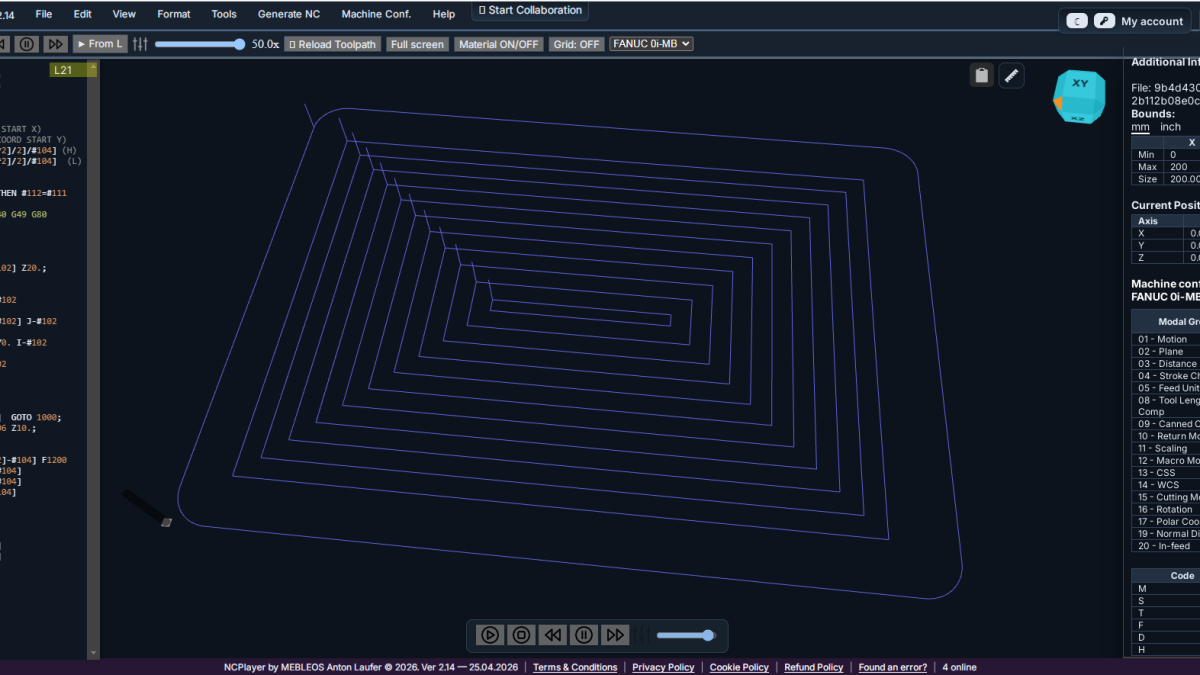
Project Sandbox in NCPlayer solves this problem as a working sandbox for NC programs. It is not just a window for running G-code. It is an isolated space where the program, project parameters, and verification scenario can be assembled safely without touching real production and without damaging the source data.
NCPlayer is an online CNC simulator and G-code debugger by CNC Passport. CNC Passport is a professional CNC ecosystem developed by MEBLEOS.
What Project Sandbox Is
Project Sandbox can be described as a temporary working environment for a CNC project. Inside it, a specialist can load or paste NC code, check the toolpath, see the program behavior, change a fragment, repeat the simulation, and understand what will happen before the file is sent to the machine.
The main idea of the sandbox is to separate verification from production risk. In a real shop, an error in a coordinate, drilling cycle, tool change, or machining plane can cost material, time, tools, and sometimes safety. In the sandbox, the same error becomes a training or diagnostic event: it can be seen, analyzed, and corrected.
This is especially important for programs that pass through several hands. One specialist prepares the code, another adapts it to the machine, a third runs it, and a fourth verifies a candidate's or student's qualification. Project Sandbox gives everyone a shared working format in which the program becomes easier to understand and verify.
Why Simple G-code Viewing Is No Longer Enough
An experienced CNC programmer can see a lot by eye: a dangerous feed, an unnecessary move, a questionable G90/G91 switch, a forgotten cycle cancellation, an incorrect plane selection, or strange compensation behavior. But even an experienced specialist cannot always keep the full dynamics of the program in mind quickly.
NC code is a sequence of states. Each line can depend on the previous one: modal G-codes, the active coordinate system, the current plane, absolute or incremental mode, cycle state, tool, compensation, variables, and jumps. The error may not be in the line itself, but in the fact that the program reached that line in the wrong state.
A normal text view shows the code, but it does not show the project as behavior. This is exactly why a sandbox is needed: to see not only what is written, but how it will execute.
Safe Checking Before the Machine
The main practical value of Project Sandbox is the ability to check a program before it contacts the machine. It does not replace engineering responsibility or the production procedure, but it helps reveal both obvious and non-obvious problems earlier.
In the sandbox, for example, it is possible to check:
- whether the toolpath leaves the expected boundaries;
- whether absolute and incremental coordinates have been mixed up;
- whether the program returns correctly after a subprogram;
- whether a cycle remains active after the intended section;
- whether the behavior matches the selected controller;
- whether there are sharp moves that should be reviewed;
- whether an error is hidden in a macro, conditional jump, or repeat.
This approach is especially useful when preparing programs after CAM, manually editing code, adapting old files, training operators, and checking candidates for CNC positions.
Working With Versions and Experiments
In real work, a simple question often appears: "What happens if we change this section?" For example, reduce an approach move, move the safe height, change the operation order, rewrite a subprogram, or test another control logic.
Without a sandbox, these experiments quickly become inconvenient. Copies of files must be created, the current version must be remembered, the production file must not be confused with a test file, and colleagues must be told exactly where the version being checked is located.
Project Sandbox makes experimentation a natural part of the workflow. A specialist can try changes, run a simulation, compare the result, and return to the original logic without the risk of damaging the working file. This is especially important when the program has not yet been approved and is still being refined.
Training and Skill Verification
The sandbox is useful not only for production, but also for evaluating CNC skills. In CNC Passport, qualification verification is built around practical actions, not only resumes or verbal answers.
Project Sandbox helps give a candidate or student a real fragment of NC code and see how they think:
- whether they notice dangerous lines;
- whether they understand modal states;
- whether they can explain the toolpath;
- whether they can diagnose an error;
- whether they propose a careful correction;
- whether they distinguish a cosmetic edit from a technologically important one.
For an employer, this is much more valuable than the general question, "Do you know G-code?" A person may know the terms but still be unable to read a program as a process. The sandbox moves the assessment into practical work.
A Shared Language Between Programmer, Operator, and Manager
In many companies, CNC communication is built around files and short comments: "check the second operation", "something is wrong with the return", "the candidate says the program is safe", or "we need to show why this cannot be run immediately".
Project Sandbox helps make these discussions concrete. Instead of a long explanation, the team can open the project, show the code section, run the simulation, and point to the exact place where the behavior changes. This reduces misunderstandings between specialists with different levels of experience.
For a manager or HR specialist, this also matters. Not every manager has to read G-code deeply, but they can see the structure of the verification: there was a program, there was a scenario, a problem was found, and a correction was made. This makes assessment and training more transparent.
Isolation From the Production Environment
The word "sandbox" should be understood literally: it is an isolated environment. Inside it, people can make mistakes, test hypotheses, and analyze complex cases without consequences for the machine, material, or current production plan.
In CNC, this is especially valuable because many errors look small in text but become large in reality. One wrong sign, a forgotten mode cancellation, an incorrect return after a subprogram, or an unaccounted coordinate system can completely change program behavior.
The sandbox does not make a person error-free. It provides a workplace where errors can be seen earlier.
How Project Sandbox Changes Project Work
When a team has a sandbox, not only the way a single file is checked changes. The whole approach to the NC project changes.
The project stops being "a file someone sent". It becomes a verifiable object: it can be opened, run, discussed, changed, checked again, and used as an example for training or assessment.
This helps in several typical scenarios:
- a programmer checks code before sending it to the shop;
- an operator analyzes an unclear section before running it;
- a technologist compares logic variants;
- an instructor shows students how G-code behaves;
- an employer checks a candidate's practical level;
- a team records typical errors and turns them into training cases.
In each case, the value is not only in simulation, but in the fact that the project becomes convenient for collaboration.
Practical Example
Imagine a program with a switch between absolute and incremental mode:
G90
G0 X0 Y0
G1 Z-5 F200
G91
G1 X10
G1 Y10
G90
G0 Z50
At first glance, the code is short and clear. But if a longer program forgets to return to G90 after G91, the following coordinates will start being interpreted differently. In text, this may look like an ordinary line. In simulation, the error becomes visible through the toolpath.
Project Sandbox makes it possible not only to say "there is an error here", but to show the behavior of that error. This is useful for correction, for training, and for checking whether a specialist understands the cause of the problem.
Who Benefits Most From This
Project Sandbox is useful for CNC programmers who want to check and refine code faster. It is useful for operators who need to understand program behavior before running it. It is useful for teachers and mentors because it explains G-code through action. It is useful for employers and recruiters who want to assess CNC skills practically, not only from words in a resume.
In CNC Passport, this logic is especially important: the platform connects training, skill verification, practical assignments, and professional validation. NCPlayer becomes the tool in this system that helps reveal not only "knowledge of G-code", but the ability to work with real programs.
Why This Matters for a Modern CNC Team
A modern CNC team works faster than before. More programs come from CAM, more edits are made for specific machines, more tasks are passed between people, and more companies hire specialists remotely or check candidates before inviting them into the shop.
In this environment, simply exchanging files no longer covers all needs. The team needs a way to quickly understand what a program does, where the risk is, how a candidate or employee thinks, and whether this level of work can be trusted.
Project Sandbox in NCPlayer addresses exactly this practical need. It helps turn an NC program from static text into a verifiable project.
Conclusion
Project Sandbox in NCPlayer is not needed for a pretty G-code demonstration, but for normal engineering work with NC programs. It provides a safe environment for verification, experimentation, training, and skill assessment.
For the programmer, it is a way to find errors faster. For the operator, it is a way to understand the program better before running it. For the instructor, it is a practical teaching tool. For the employer, it is a more honest way to see a specialist's practical level. For the team, it is a shared format for discussing CNC projects.
NCPlayer helps move part of the risk from the shop floor into simulation. That means real machines, tools, and people get a better chance to work calmly, predictably, and professionally.